TL;DR
After taking Operating Systems Fundamentals, I wanted to move from “understanding on paper” to “understanding in code.” This project came from that need: building a mini shell in C to see, in practice, how processes, pipes, redirections, signals, and dynamic memory work together.
I did not try to clone Bash. I aimed for something more useful for learning: a small, readable system with clear boundaries.
The origin: when theory falls short
There is one very specific moment that pushed me to build this.
In class we talked about fork(), process tables, file descriptors, and execve(). Conceptually, it all made sense. I could answer exam questions. But when I asked myself, “what exactly happens when I type cat file | wc -l in a terminal?” my real answer was: “I kind of know.”
And that “kind of” bothered me.
So I set a goal: build a minimal shell from scratch in C, and force myself to truly solve what a shell solves every time it runs a command.
Not to ship an impressive feature. Not to sell anything. Not to show off complexity.
Just out of properly focused technical curiosity.
The project idea in one sentence
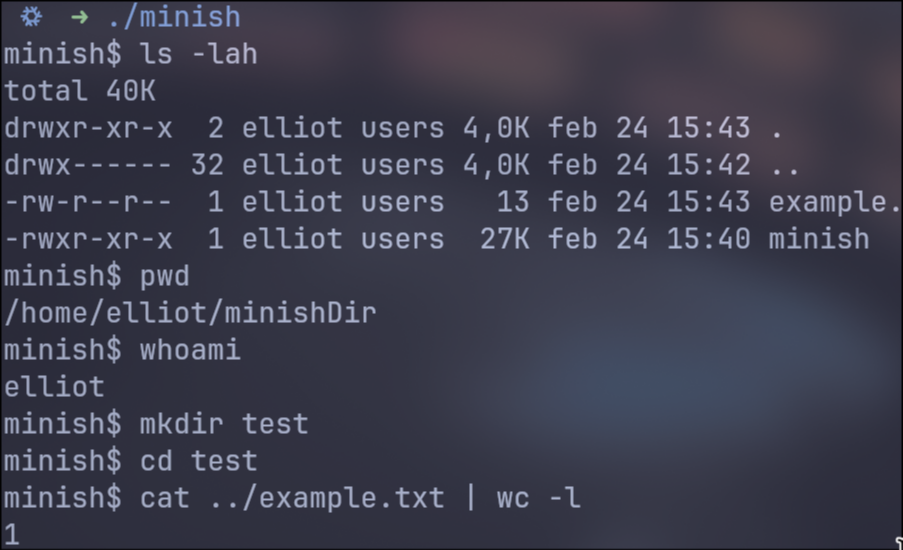
minish is a POSIX-style mini shell for learning that runs external commands, supports pipelines/redirections, and includes basic builtins.
The important part is not the feature list. The important part is that each feature was chosen to exercise a systems concept:
- External commands ->
fork+execvp - Pipelines ->
pipe+dup2+ correct FD closing - Redirections ->
open+dup2 - Shell state -> builtins executed in the parent when needed
- Interactive control ->
SIGINThandling
Real scope (no hype)
What it does
- Interactive loop with prompt (
minish$) - Line reading with
getline - Token/operator parsing:
|,<,>,>> - Basic support for single and double quotes
- Common syntax validations
- External command execution via
PATH(execvp) - N-command pipelines
- Input/output redirections
- Builtins:
cd,pwd,echo,exit - Basic
Ctrl+Chandling
What it does not do (intentionally)
- No variable expansion (
$HOME,$?) - No
&&,||,;,&operators - No job control (
jobs,fg,bg) - No full Bash-style parser (advanced escapes/quoting)
- No history/autocomplete
This point is key when defending the project: explicitly defining boundaries is a mature technical decision, not an accidental limitation.
Architecture: separation of responsibilities
The structure is designed so each module does one thing and does it well:
-
src/main.c- Main REPL
- Interactive prompt
SIGINTcapture/management- Calls parser and executor
-
src/parser.c- Line tokenization
- Operator detection
pipeline_tconstruction- Syntax errors
-
src/executor.c- Command execution
- Pipe creation
- Redirections with
dup2 fork,execvp,waitpid
-
src/builtins.ccd,pwd,echo,exit
-
src/utils.c- Safe memory wrappers (
xmalloc,xrealloc,xstrdup)
- Safe memory wrappers (
-
include/minish.h- Shared data types
- Prototypes and module contracts
This split helped me iterate quickly without breaking everything on each change.
End-to-end command flow
When a user types a command, the path is:
mainreads the line withgetline.- If there is content, it calls
parse_line. - The parser returns a
pipeline_tstructure (or a syntax error). execute_pipelinewalks the commands:- It decides whether it is a parent-executed builtin (simple case), or
- It creates child processes and pipes (general case).
- It waits for all children with
waitpid. - It takes the last command’s status.
- It frees memory (
free_pipeline) and returns to the prompt.
The key in this flow is that there is no magic: these are direct, traceable steps.
Important technical decisions and why
1) State-changing builtins run in the parent process
I decided that if there is a single command and it is a builtin, it runs in the parent.
Reason:
cdmust change the real shell’s working directory.exitmust modify global shell state.
If this runs in a child, the effect dies with the child. This is one of those OS lessons you truly internalize when implementing it yourself.
2) execvp instead of absolute/manual paths
Using execvp simplifies things and aligns behavior with a real shell: it looks up binaries in PATH.
That allows running ls, cat, wc, etc. without manually resolving paths.
3) Simple parser with explicit limits
I did not want to build a complex grammar at this stage.
I preferred a linear, predictable parser with clear errors:
- “Unclosed quotes”
- “Pipe without command”
- “Missing file for redirection”
- “Duplicate redirection”
The goal was robustness and understandability, not full shell syntax support.
4) Dynamic memory for variable-length structures
A shell does not know how many words, commands, or pipes a line will contain.
That is why token_list_t, argv, and pipeline->commands grow with xrealloc.
And that is why wrappers (xmalloc, xrealloc, xstrdup) exist, so I do not repeat NULL checks at every call site.
5) Signal handling designed for interactive mode
In the main shell process, SIGINT should not kill the whole shell.
In child processes, default behavior is better so external commands react normally to Ctrl+C.
This separation greatly improves interactive UX and mirrors how real shells behave.
Where it was hardest (and why)
File descriptor closing in pipelines
This was the classic point where one small detail breaks everything:
- Close too early -> command loses input/output
- Do not close -> deadlocks or leaks
Understanding the correct order of dup2, close, and FD inheritance was one of the most formative parts of the project.
Redirections for parent-executed builtins
For builtins running in the parent process, you need temporary redirection and then restoration of the shell’s stdin/stdout.
If you do not restore them, the shell stays in a broken state for later commands.
Exit status consistency
Running commands is not enough: status codes must be coherent.
In pipelines, minish uses the last command’s status, which is what users and basic scripting expect.
Current drawbacks and known issues
This section is important for an honest defense: what works well today and what is still fragile.
| Drawback | Current state | Consequence |
|---|---|---|
| Limited quoting/escaping | Supports basic single and double quotes, but not a full Bash-like escaping model; it also does not interpret sequences like \n in echo except literally. |
Some commands that are valid in Bash behave differently here or are not supported. |
| No variable expansion | Does not replace $HOME, $USER, $?, etc. |
Common shell scripts and habits do not work as-is. |
| No control-flow operators | No &&, ||, ;, or background execution with &. |
You cannot chain command logic on a single line like in full shells. |
| No job control | No jobs, fg, bg. |
No control over background processes. |
| Builtins with limited options | echo implements a minimal version (simple -n) and cd, pwd, exit do not cover all variants from mature shells. |
Partial compatibility focused on learning. |
| Fail-fast memory handling | If malloc/realloc/strdup fails, the program exits. |
Valid for an educational context, but it does not provide graceful product-level degradation. |
| Mostly manual testing | Validation relies mostly on manual command tests. | Missing automated tests to systematically detect regressions. |
| Basic UX and messaging | Error messages are functional but improvable; no history or autocomplete. | User experience is still simple. |
| Portability not fully audited | Depends on POSIX APIs (fork, execvp, dup2, waitpid, etc.). |
Works well on Unix-like systems, but it does not target broad cross-platform support (e.g., native Windows without a POSIX layer). |
A concrete execution example
Command:
cat < salida.txt | wc -cWhat happens internally, in short:
- The parser creates two
command_tentries in apipeline_t. - The executor creates one pipe.
- Child 1 (
cat):- Opens
salida.txt dup2(file_fd, STDIN_FILENO)dup2(pipe_write, STDOUT_FILENO)execvp("cat", ... )
- Opens
- Child 2 (
wc -c):dup2(pipe_read, STDIN_FILENO)execvp("wc", ... )
- Parent closes unused pipe ends and waits for both children.
- Returns the last status (
wc).
Seen this way, it stops being magic and becomes system mechanics.
Quick code look (real snippet)
This block comes from src/executor.c (original repository), inside execute_pipeline:
pid_t pid = fork();if (pid < 0) { perror("fork"); if (pipefd[0] != -1) { close(pipefd[0]); } if (pipefd[1] != -1) { close(pipefd[1]); } if (prev_read != -1) { close(prev_read); } for (int j = 0; j < started; ++j) { waitpid(pids[j], NULL, 0); } free(pids); return 1;}
if (pid == 0) { signal(SIGINT, SIG_DFL);
if (prev_read != -1) { if (dup2(prev_read, STDIN_FILENO) < 0) { perror("dup2"); _exit(1); } }
if (needs_pipe) { if (dup2(pipefd[1], STDOUT_FILENO) < 0) { perror("dup2"); _exit(1); } }
if (pipefd[0] != -1) { close(pipefd[0]); } if (pipefd[1] != -1) { close(pipefd[1]); } if (prev_read != -1) { close(prev_read); }
if (apply_redirections(&pipeline->commands[i]) != 0) { _exit(1); }
if (is_builtin(pipeline->commands[i].argv[0])) { int st = execute_builtin(shell, pipeline->commands[i].argv); _exit(st); }
execvp(pipeline->commands[i].argv[0], pipeline->commands[i].argv); fprintf(stderr, "%s: %s\n", pipeline->commands[i].argv[0], strerror(errno)); _exit(127);}
pids[i] = pid;started++;
if (prev_read != -1) { close(prev_read);}if (pipefd[1] != -1) { close(pipefd[1]);}prev_read = pipefd[0];This is what the most delicate part looks like in real code: fork, dup2, FD closing, and command execution.
What is happening here, step by step:
-
fork()splits execution into parent and child. If it fails (pid < 0), the code cleans everything opened so far (pipe ends,prev_read), waits for already-started children, and returns error. This cleanup prevents leaks and inconsistent states. -
In the child,
SIGINTis reset to default.signal(SIGINT, SIG_DFL)lets the external command respond toCtrl+Clike in a real shell. The main shell process may follow a different policy, but the child should behave “normally.” -
dup2wires the pipeline into the right command. Ifprev_readexists, it is duplicated toSTDIN_FILENO(current command input). Ifneeds_pipeis true,pipefd[1]is duplicated toSTDOUT_FILENO(output to next command). In practical terms: input from previous command, output to next command. -
After
dup2, original FDs are closed. This is key: after duplication, old descriptors are no longer needed. If they stay open, you may cause deadlocks (because a write end remains open) or consume resources unnecessarily. -
Redirections are applied and then command execution happens.
apply_redirections(...)can overridestdin/stdoutfor<,>, or>>. Then, if the command is a builtin, it runs in the child (pipeline case); otherwiseexecvpis called. Ifexecvpfails, it exits with127, the typical code for “command not executable/not found.” -
The parent keeps pipeline control. It stores the
pid, closes what it no longer needs, and movesprev_readto the read end of the newly created pipe. This pattern allows chaining N commands without mixing descriptors.
In short: this snippet does not just “spawn processes”; it implements a precise choreography of descriptors and signals. Change the order of these steps and the pipeline can break even with the same system calls.
Why this project helped me so much
Because it forced me to answer questions I could avoid in class:
- “What exactly changes after
fork?” - “What does a child inherit and what not?”
- “When should I close each FD?”
- “Why can’t
cdjust be an external executable?” - “How does a system error surface in terminal UX?”
Most importantly: it forced me to debug real behavior, not just repeat concepts.
Technical lessons I take with me
-
Systems work is about operation order. The same set of calls can work or fail depending on order.
-
A clear module API is gold. Separating parser/executor/builtins made the code defendable and maintainable.
-
Defining scope early avoids chaos. Explicitly deciding what NOT to implement keeps focus and quality.
-
Clear errors are part of the product. A systems program without useful messages is much harder to use and debug.
-
Dynamic memory is not optional here. In a shell, almost everything has variable size.
If I had a next iteration
The natural progression would be:
- Variable expansion (
$VAR,$?) - Logical operators (
&&,||) - More complete quoting/escaping parser
- History and autocomplete
- Automated parser and execution tests
That way the shell would grow without losing the foundation already built.
Personal closing
The most valuable part of minish is not that it runs ls or supports pipes.
The valuable part is moving from “I understand it theoretically” to “I know exactly what is happening, where it can break, and why.”
If this project has one core idea, it is this: focused technical curiosity turns abstract concepts into real intuition.
And for me, that already made it worth it.