
TL;DR
image-uploader is a full-stack app that lets you upload images (drag & drop or manual selection) and get a public link to share them. The backend runs on Spring Boot, the frontend on Angular, and storage uses AWS S3.
The project started as a devChallenges.io challenge solution, but I took it beyond the brief: custom Java backend, real cloud storage, CI with GitHub Actions, and separate deployment for frontend (Vercel) and backend (Railway).
The origin: a challenge I scaled up
The original devChallenges brief asked for an image upload app. Many solutions use local storage or third-party services with frontend SDKs. I wanted to do it differently:
- Custom backend in Spring Boot, not just a frontend talking to a third-party API.
- Real cloud storage on AWS S3, not the server’s filesystem.
- Full deployment, with frontend and backend on separate services.
The motivation was clear: I wanted a project that forced me to solve real cloud integration problems, not just UI ones.
What the app does
Features
- Image upload via drag & drop or file selection.
- Multi-format support: PNG, JPG/JPEG, SVG, TIFF, WEBP.
- 500MB limit per image.
- Visual loader during upload.
- Public link generation for sharing.
- Copy-to-clipboard button.
End-to-end flow
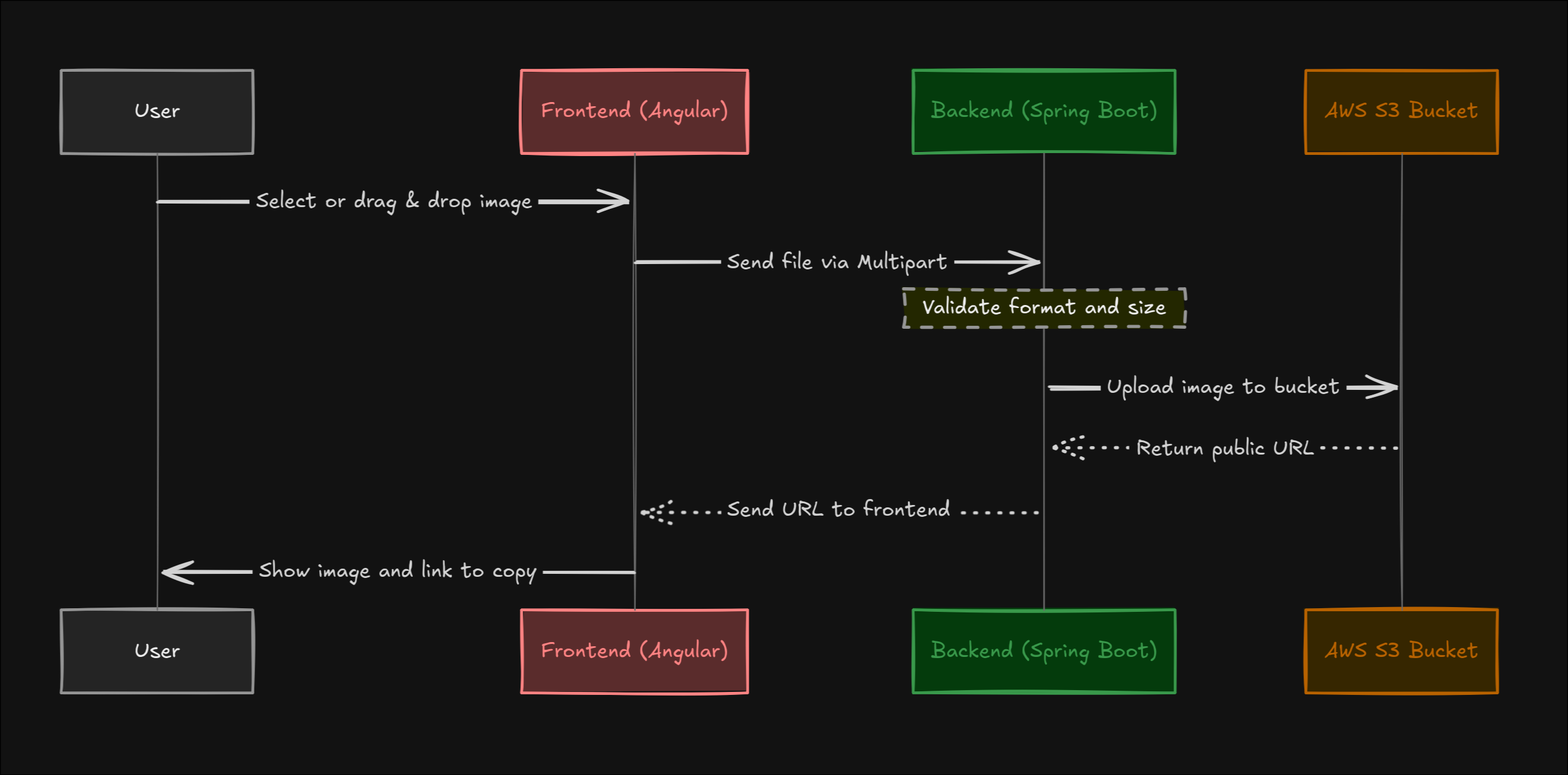
Technical decisions
Spring Boot + AWS S3
Using the AWS SDK for Java from Spring Boot was the most interesting backend part. I had to handle:
- AWS credential configuration (access key, secret, region, bucket).
- Object upload with
PutObjectRequestand content-type metadata. - Bucket access policy to make images publicly accessible.
It is not a complex pattern, but doing it for the first time forced me to understand how S3 works under the hood, not just “upload a file.”
Angular as frontend
User experience depends heavily on three things: drag & drop, the loader, and the transition between states (empty, uploading, completed, error).
Using Angular gave me structure to manage those states predictably with RxJS, though for such a simple app the framework was arguably overkill. It was a learning decision, not an efficiency one.
CI with GitHub Actions
The pipeline validates that the project compiles correctly on every push. There are no end-to-end tests, but there is compilation and basic validation.
Separate deployment
- Frontend on Vercel (static Angular build).
- Backend on Railway (Spring Boot with Docker).
This separation taught me to handle CORS, configure cross-domain communication, and understand that deploying a full-stack app is not “one deploy.”
What I learnt from the project
- Integrating a real cloud service changes your perspective. Going from “upload to localhost” to “upload to S3” means understanding credentials, permissions, regions, and costs.
- CORS is not just “add a header and done.” Understanding preflight requests, cross-domain behavior, and which headers each side accepts saved me problems in later projects.
- A challenge can be the starting point, not the ceiling. The devChallenges brief was basic, but the implementation I chose took me much further.
- Deployment is part of the project, not a final step. Separating frontend and backend into different services taught me more about operations than any tutorial.
Conclusion

image-uploader was one of the first projects where I connected frontend, backend, and a real cloud service on my own. It is not a complex application, but the process of taking it from a challenge brief to a working deployment with S3, Docker, CI, and separate domains was far more formative than I expected.
Sometimes the apparently simple projects are the ones that teach you the most about how things work outside of localhost.